Career Insights
How to Write a LinkedIn Headline and Summary That Actually Gets Recruiter Views
Your LinkedIn profile may look polished but still be invisible to recruiters. Here's how to write a headline and About section that communicates relevance with real before/after examples and a simple formula.
By Kavya · 10 Sept 2026
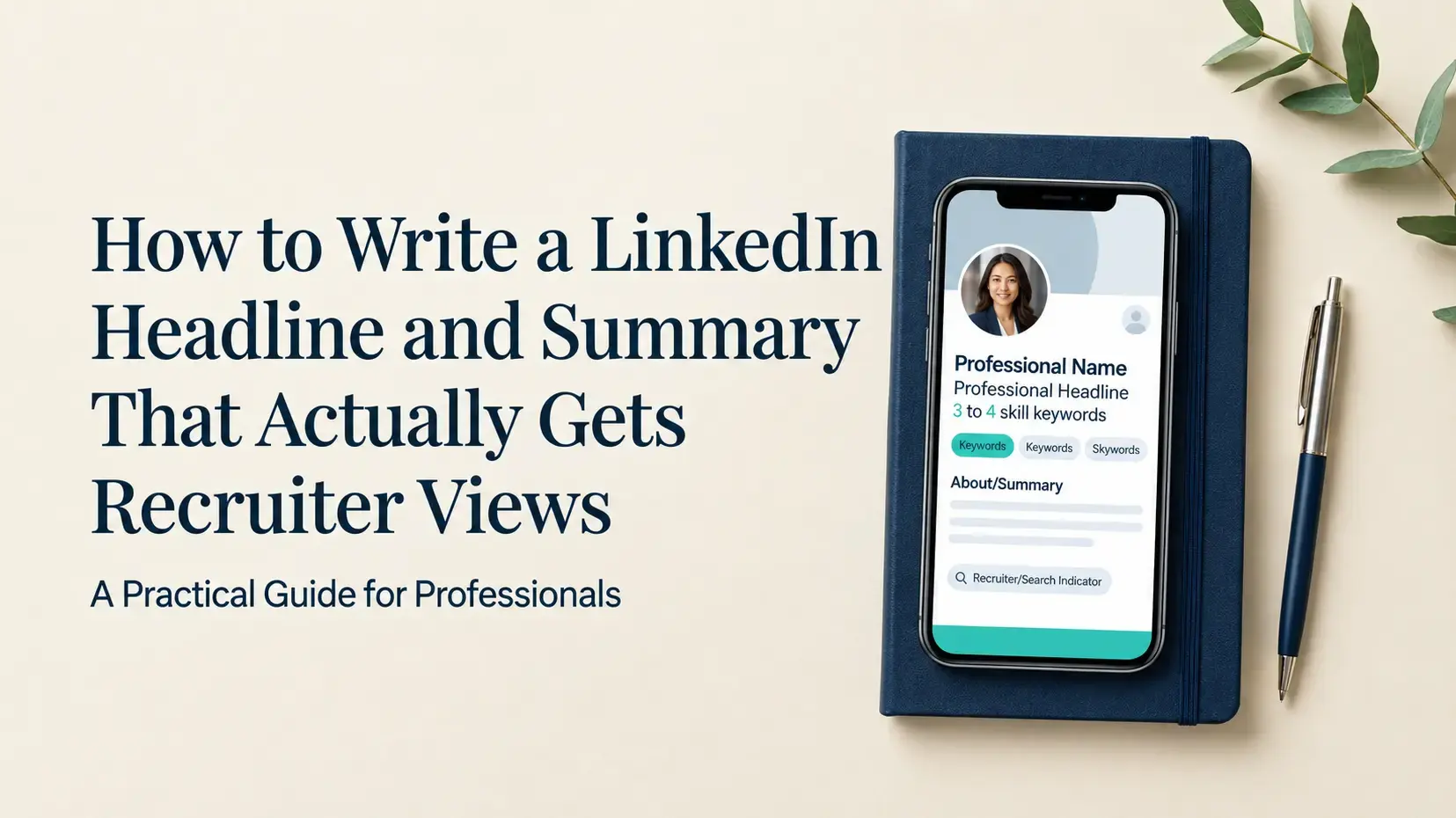
Quick Answer: A LinkedIn headline that gets recruiter views leads with your target job title, adds 2–4 core searchable skills, and includes a meaningful differentiator. Your About section should support that headline with real experience, outcomes, and natural keyword usage. Neither guarantees views but both significantly improve your chances of appearing in the right recruiter searches in India's job market.
Why Your LinkedIn Profile May Be Invisible to Recruiters
You have five to ten years of experience. Your LinkedIn profile is filled in. Your photo is professional. Your work history is accurate. And yet recruiter views remain low or nonexistent.
This is more common than most professionals realise, and the reason is usually not a lack of experience or skill.
A LinkedIn profile can look professionally complete and still be poorly searchable. Recruiters at Indian companies - IT services firms, product startups, BFSI companies, consulting firms do not browse profiles randomly. They search. They filter. They shortlist from the top of a ranked results page.
If your profile is not built around how they search, it simply does not appear regardless of how strong your actual background is.
Your headline and About section are two of the most important fields in that search process. This blog explains how to write both, with real before-and-after examples, two reusable formulas, and a checklist you can use before you publish.
Where Is the LinkedIn Profile Headline?
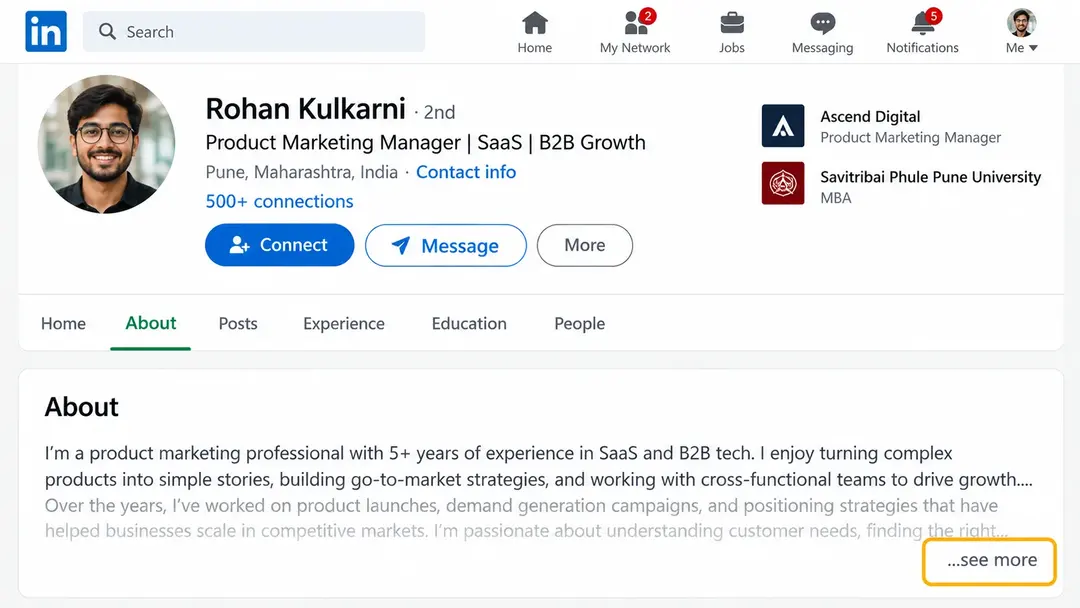
Your LinkedIn headline appears directly below your name at the top of your profile — the first piece of professional information anyone sees when they land on your page, or when your profile appears in a recruiter's search results.
By default, LinkedIn populates this field with your current job title and company. Most professionals leave it exactly as LinkedIn filled it in.
That is a missed opportunity.
The headline field allows up to 220 characters and is one of the fields LinkedIn's search algorithm reads when matching your profile to a recruiter's search. It is also the first line a recruiter reads when deciding whether to click on your profile from a list of results.
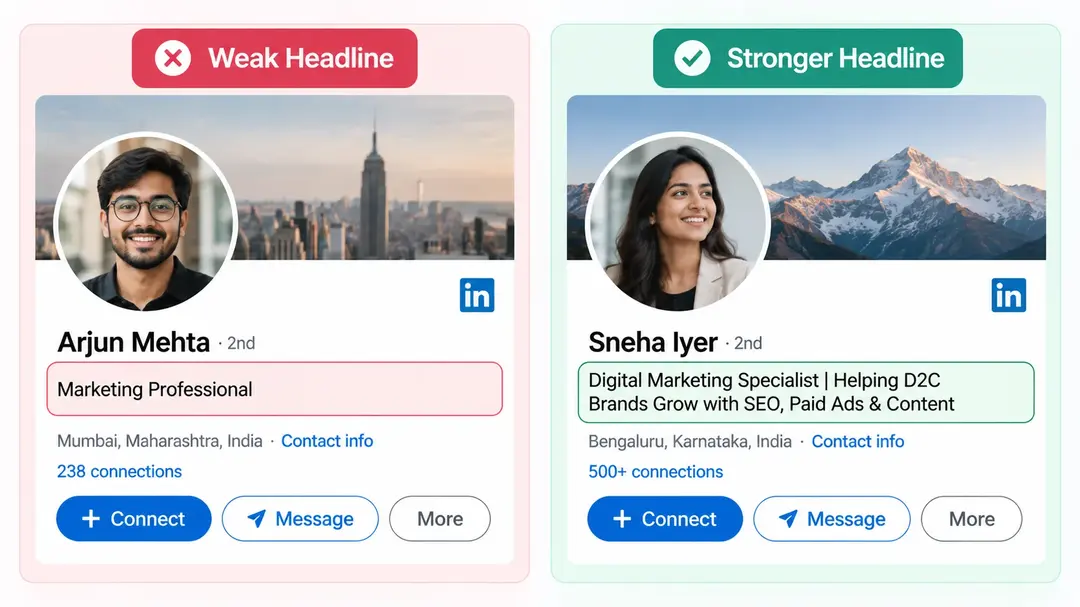
Compare these two headlines:
Weak: Seeking new opportunities | Hardworking Professional
Stronger: Data Analyst | SQL | Power BI | Python | Business Intelligence | Turning Data Into Actionable Insights
The second one immediately answers three questions a recruiter is asking:
Who is this person professionally?
What do they specialise in?
What terms would I search for if I wanted someone like this?
What Should a LinkedIn Headline Include?
A strong LinkedIn headline follows a simple framework:
Target role + relevant searchable skills + differentiator
For example:
Product Manager | Data and AI Platforms | Product Strategy | GenAI | Enterprise Products
This works because it does not try to be impressive it tries to be findable and clear. A recruiter should be able to understand what role you are suited for without opening your full profile.
Some professionals make the mistake of writing a headline that sounds good but means nothing to a keyword search. Phrases like "dynamic professional" or "passionate about impact" match zero recruiter searches. A recruiter searching for a Product Manager types "Product Manager" not "passionate about impact."
Your headline should be built around the exact terms your target recruiters are likely to search, combined with the skills that define your specialisation.
Before and After LinkedIn Headline Examples
Here are real headline transformations across common Indian job market Roles:
HR:
❌ HR Professional | Looking for Opportunities
✅ HR Operations Executive | HR MIS | Employee Onboarding | Payroll Coordination | Excel | HR Operations
Data:
❌ Data Professional | Analytics Enthusiast
✅ Data Analyst | SQL | Power BI | Python | Excel | Business Intelligence
DevOps:
❌ DevOps Engineer | Cloud Enthusiast
✅ DevOps Engineer | AWS | Kubernetes | Terraform | CI/CD | Docker | Infrastructure Automation
Product:
❌ Product Manager | Technology Professional
✅ Product Manager | Enterprise Data and AI Platforms | Product Strategy | GenAI | Data Products | Roadmaps
In each case, the stronger version replaces vague language with specific, searchable terms that reflect real skills and a clear professional direction.
A Simple Formula to Write Your LinkedIn Headline
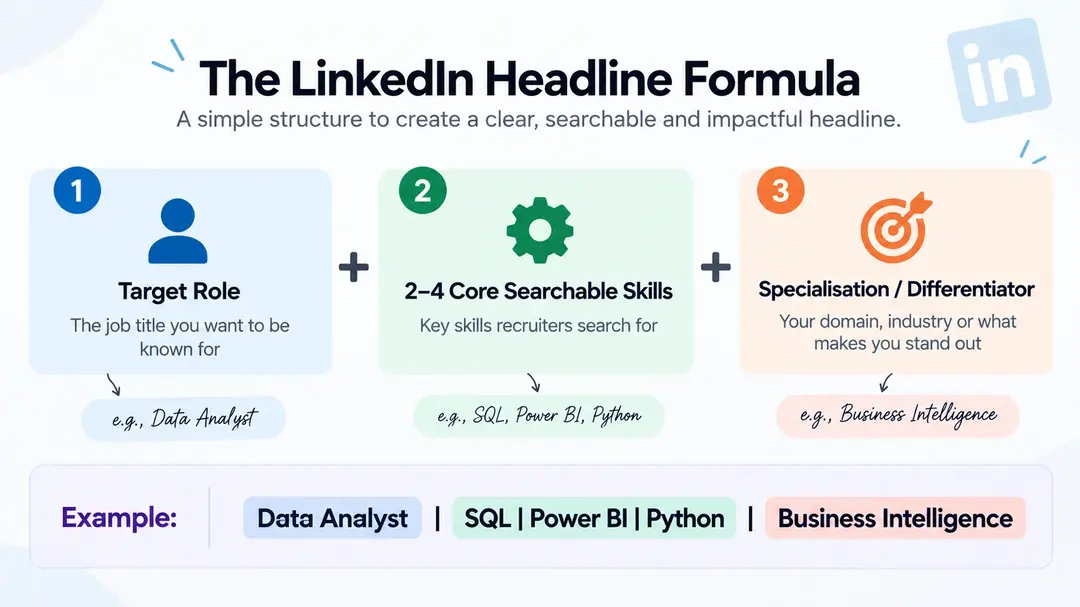
Use this formula as a starting point:
[Target Role] | [2–4 Core Searchable Skills] | [Specialisation / Industry / Differentiator]
Example:
Data Engineer | AWS | PySpark | Spark | ETL Pipelines | Cloud Data Engineering
Two important rules when applying this formula:
First — only add keywords you can genuinely support with real experience. A recruiter who contacts you based on your headline will ask about those skills in a screening call. If you listed Kubernetes but have never worked with it, that mismatch will surface immediately.
Second — do not turn your headline into a pure keyword list with no readability. The formula should produce a headline a human recruiter would also understand at a glance, not just a string of terms the algorithm might pick up.
How Long Should a LinkedIn Profile Summary Be?
There is no single word count that guarantees recruiter views. LinkedIn's About section allows up to 2,600 characters, but using all of it is neither required nor always useful
A more practical way to think about length: your About section should be long enough to establish your professional identity, expertise, evidence and direction and no longer. It should not be a biography. It should not list every tool you have ever touched. It should not repeat your headline word for word.
In practice, three to five focused paragraphs usually achieve this. That is typically 150 to 300 words enough to communicate who you are, what you do well, what you have achieved, and what you are looking for next
The opening two lines matter most. LinkedIn truncates the About section on desktop and mobile after roughly 200–300 characters before requiring the reader to click "see more." If those first two lines do not communicate your professional focus clearly, many recruiters will not read further
How Many Words Should a LinkedIn Profile Be?
LinkedIn profiles are not essays and there is no ideal total word count for an entire profile. Different sections serve different purposes and should be written accordingly:
Headline — positioning and searchability, 220 characters maximum
About — professional story, expertise, evidence and direction
Experience — role-specific evidence and achievements
Skills — searchable expertise, up to 100 skills (50+ recommended for discoverability)
Focusing on hitting a specific total word count will not improve your recruiter visibility. Focusing on the clarity, accuracy and relevance of each section will.
Your About Section Should Support Your Headline
The About section is where your headline's claim becomes credible. If your headline positions you as a Senior Data Engineer, your About section should provide evidence of exactly that.
For example, if your headline says:
Senior Data Engineer | AWS | Spark | PySpark | Data Pipelines
Your About section might open with:
"Data Engineer with 7 years of experience designing and optimising cloud data pipelines across AWS environments. I have worked with Spark and PySpark to process large-scale datasets, built ETL workflows that reduced processing time significantly, and supported business intelligence teams across BFSI and product organisations in India."
That opening paragraph immediately confirms the headline's claim with real context technologies, scale, industry experience, and geography.
What to avoid in your About section:
"I am a hardworking, passionate and dedicated professional who thrives in challenging environments."
Those words describe almost anyone. They add no searchable information and give a recruiter no reason to contact you over the next profile in their results
Use this structure for your About section:
Opening — who you are and what you specialise in
Middle — skills, experience and outcomes
Closing — what opportunities you are open to
Use Keywords Naturally — Not as a Keyword List
Keywords should appear naturally across the relevant sections of your profile, not crammed into one paragraph or repeated artificially.
Instead of writing:
"SQL, SQL, SQL, Power BI, Power BI, Excel, SQL..."
Use them in context:
"Built SQL-based reporting workflows and Power BI dashboards to monitor operational KPIs and support business decision-making across finance and operations teams."
This makes your profile readable for a human recruiter while still communicating relevant expertise to LinkedIn's search algorithm. Both matter. A recruiter who finds your profile through a search still has to read it and decide whether to contact you keyword density alone will not make that decision for them.
For a full guide on using AI to extract the right keywords from job descriptions, see our Should your Linkedin be same as your Resume — many of the same principles apply to LinkedIn keyword alignment.
Keep Your LinkedIn Profile Consistent
One of the most common credibility problems on LinkedIn is inconsistency across sections.
Your headline, About section, Experience section, Skills, job titles, and dates should all tell the same overall career story. When they do not, a recruiter notices and the profile becomes difficult to evaluate.
A common mismatch that hurts Indian professionals in recruiter searches:
Headline: Cloud Data Engineer
Experience section: Manual testing, production support, Excel reporting across two of the last three roles.
That gap between the headline's claim and the experience section's evidence raises an immediate question in a recruiter's mind. When in doubt, they move to the next profile.
Before publishing any update, check that your career positioning is consistent from top to bottom. Also ensure your LinkedIn profile and resume are telling the same story see how recruiters search LinkedIn in India for more on how recruiters evaluate profile-to-resume consistency.
Does a Strong LinkedIn Headline Guarantee Recruiter Views?
No.
This is worth being direct about. Headline wording can improve clarity and strengthen keyword relevance, but recruiter visibility on LinkedIn depends on several factors that your headline alone cannot control:
How closely your profile matches a recruiter's specific search filters
Your location relative to the role's requirements
Your years of experience relative to the seniority being hired for
How many other candidates in the same city match the same search
Whether your Open to Work settings are configured correctly
How recently your profile has been updated
Competition levels in your target role and city
A well-written headline improves your chances of appearing in the right searches and being understood quickly when you do appear. It does not override the other factors that determine recruiter discovery.
A Simple Formula for Your About Section
Use this five-part structure as your writing guide:
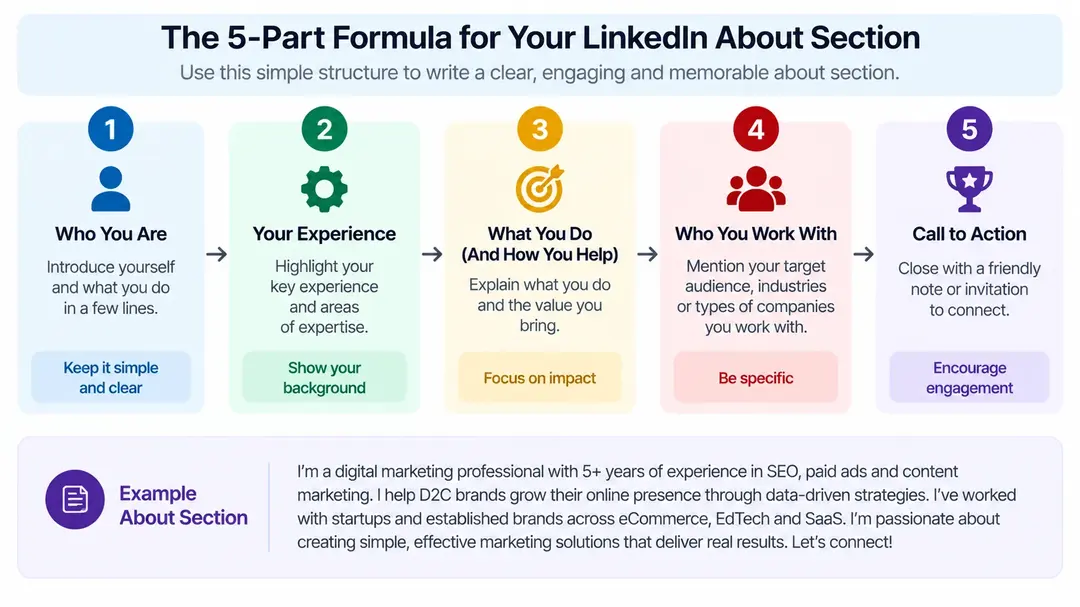
Who I am → What I specialise in → What I have done → What I can contribute → What I am looking for
Example for a Data Analyst:
"Data Analyst with 5 years of experience turning complex datasets into business decisions. I specialise in SQL, Power BI and Python-based analysis across FMCG and retail sectors. In my last role, I built dashboards that reduced monthly reporting time and supported category teams with pricing and demand analysis. I am currently open to Data Analyst and Business Intelligence roles at product companies or analytics-first organisations in Bengaluru and Hyderabad."
That About section is under 300 words. It is specific, evidence-led, and clear on what the candidate is looking for — which is exactly what a recruiter needs.
LinkedIn Headline and About Section Checklist
Before publishing any update to your LinkedIn profile, run through this checklist:
Headline
Target role is immediately obvious
Relevant, searchable keywords are included
A differentiator or specialisation is clear
No generic phrases like "seeking opportunity" or "passionate professional"
Every keyword can be supported with real experience
About section
Opening two lines identify your professional focus clearly
Skills mentioned are supported by experience in the Experience section
At least one or two concrete outcomes or evidence points are included
Keywords appear naturally in sentences not as a list
Career direction or target role is stated clearly at the end
Consistency
Job titles in Experience section match the positioning in your headline
Dates are accurate and complete
Skills listed match what the Experience section actually shows
All claims can be supported if a recruiter asks about them in a screening call