Career Insights
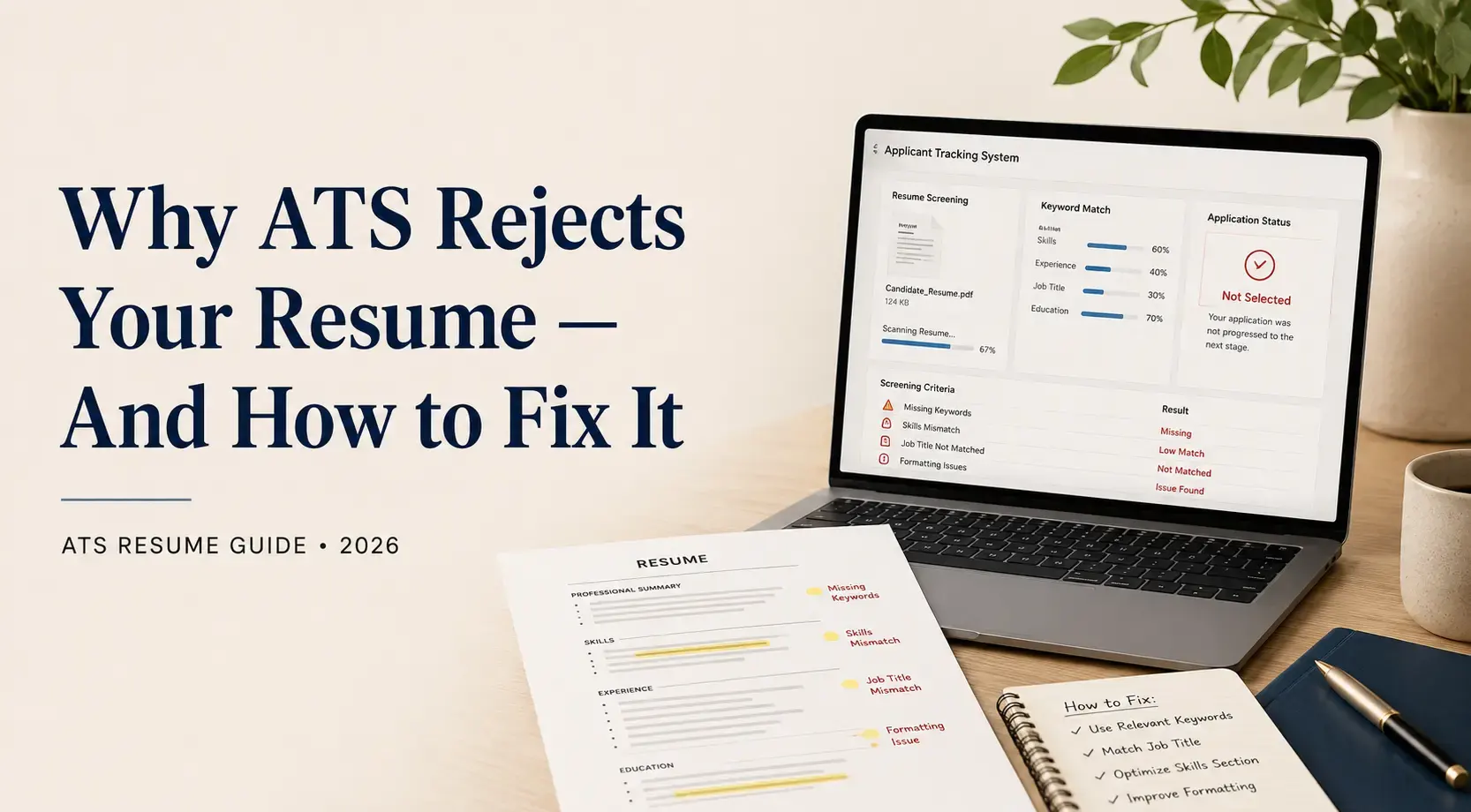
Why ATS Rejects Your Resume in 2026 — And How to Fix It
Most resumes never reach a recruiter. An ATS filters them out first — silently, automatically, and for entirely fixable reasons. Here is what is blocking you.
By ProfileNext Career Team · 7 Apr 2026
You apply for a role you are clearly qualified for. Days pass. No response. You apply again — another company, then another. Still silence.
Before you question your experience or your skills, consider this: the problem is almost certainly not you. It is your resume — and the way it is being read.
In 2026, over 90% of mid-size and large companies in India use an Applicant Tracking System (ATS) to screen resumes. Most candidates — even highly experienced professionals — are being automatically filtered out due to entirely preventable mistakes, long before any human ever sees their application.
This guide explains exactly how ATS works in the Indian job market, the 5 most common reasons resumes get rejected, and a clear, actionable fix for each one.
Table of Contents
What Is ATS — And Why Does It Matter in India?
The 5 Real Reasons Your Resume Never Reaches a Recruiter
ATS-Readiness Checklist
Frequently Asked Questions
Ready to Stop Getting Filtered Out?
What Is ATS — And Why Does It Matter in India?
An Applicant Tracking System (ATS) is software that companies use to receive, screen, score, and filter job applications before a recruiter ever reviews them. When you apply through a company's careers page, Naukri, or LinkedIn, your resume is parsed by this system first.
Naukri runs its own built-in system — Naukri RMS (Resdex) — which processes millions of resumes every day. Recruiters on Naukri filter candidates by keywords, experience range, location, current CTC, and notice period. If your resume or Naukri profile does not match their filters, you will never appear in their search results — regardless of how qualified you are.
LinkedIn's Easy Apply also uses recruiter-side filters that work similarly — screening by title, skills, location, and years of experience before a human ever clicks on your profile.
This is why ATS optimisation is no longer optional. It is the difference between getting calls and getting silence.
The 5 Real Reasons Your Resume Never Reaches a Recruiter
These are not cosmetic issues. Each of the following is a structural failure that causes ATS to score your resume so low it is automatically filtered out — before any human sees it.
1. You Are Using the Wrong Keywords
ATS does not read your resume the way a human does. It scans for specific words and phrases — and if those words are missing, your score drops immediately.
Most job seekers write their resume in their own language. But ATS is looking for the exact language used in the job description. If the JD says "stakeholder management" and your resume says "managed client relationships," the system may not connect those two phrases — and you lose points.
The Fix: Read the job description carefully. Identify the exact role titles, technical skills, tools, certifications, and industry terms used — especially anything mentioned more than once. These are the specific terms the ATS is scanning for. Then incorporate those exact phrases naturally into your Summary, Skills, and Work Experience sections.
To build a strong keyword list, check three to five similar job postings and identify the terms that appear consistently across all of them. Free tools like Jobscan (jobscan.co) can also compare your resume against a specific JD and highlight the keyword gaps.
Important: Do not stuff keywords unnaturally. ATS rewards relevant usage; human recruiters will catch keyword padding immediately when they read the shortlisted resume.
2. Your Resume Format Is Breaking the Parser
ATS software reads resumes linearly — top to bottom, left to right — in the same order the text appears in the underlying file. When your resume has columns, tables, text boxes, or graphics, the parser loses track of what belongs where. Skills from one column get merged with job titles from another. Dates appear next to the wrong company. Section headings disappear entirely.
The result is a resume that is technically submitted but structurally unreadable to the system — and it scores near zero.
This is one of the most common reasons resumes built in Canva, Zety, and other design-heavy tools are automatically rejected on Naukri and most corporate ATS platforms, despite looking impressive on screen.
The Fix: Use a clean, single-column layout with no tables, columns, text boxes, sidebars, or embedded graphics. Your information should flow from top to bottom in a straight line. Use standard section headings: Summary, Work Experience, Education, Skills, Certifications.
3. Your File Format Is Unreadable to ATS
Not all resume files are equal in the eyes of an ATS. Scanned PDF resumes — common when people scan a printed copy of an old resume — are treated as images. Most ATS platforms cannot extract any text from them at all. PDFs created in Canva, Adobe Illustrator, or any graphic design tool often have text embedded in ways that cannot be parsed correctly.
The Fix: Submit your resume as a .docx file or a text-based PDF exported directly from Microsoft Word or Google Docs. When in doubt, .docx is the safest and most universally compatible format across all ATS platforms, including Naukri RMS.
4. Your Resume Has No Measurable Results
ATS systems at larger companies are increasingly trained to identify outcome-driven language — not just a list of responsibilities. Resumes that read like a job description ("Responsible for managing a team of 10") score lower than resumes that demonstrate real impact ("Led a team of 10 engineers to deliver a ₹2Cr project 3 weeks ahead of schedule").
Beyond ATS scoring, this matters for the recruiter who eventually reads your resume. A shortlist of 10 qualified candidates all have similar responsibilities. What separates you is the result you delivered.
The Fix: Rewrite every bullet point to answer the question: "What changed because of what I did?" Include numbers wherever possible — team size, revenue impact, percentage improvements, cost savings, timelines, or scale. Even estimates based on real context are more compelling than vague statements.
5. Your Resume Is Not Tailored to the Specific Job
Sending the same resume to every application is one of the most common — and most costly — mistakes job seekers make. ATS systems compare your resume against the specific job description they are attached to. A generic resume that covers many roles broadly will score lower than one that is specifically aligned to the JD in front of it.
This is not just about keywords. ATS evaluates whether your experience level, job titles, skills, and industry terminology match what the employer defined for that specific role.
The Fix: Maintain a "master resume" with all your experience. For each application, create a tailored version — adjust your summary, reorder or add relevant skills, and mirror the language of that specific JD. This does not mean rewriting the whole document each time; a 15-minute targeted edit can significantly improve your ATS score.
Real Result — ProfileNext Client
A Senior Product Manager from Hyderabad had applied to 40+ roles over 3 months with zero interview calls. After fixing all five issues above — reformatting to a single column, tailoring to each JD, replacing responsibility bullets with impact metrics, and switching to a .docx file — she received 4 interview calls in her first week.
ProfileNext has helped 700+ professionals go from silence to multiple calls per week.
Not sure which of these issues is blocking you? Get a free resume review from ProfileNext — we'll tell you exactly what to fix. → Book Your Free Strategy Call
ATS-Readiness Checklist
Before submitting your next application, run through this checklist. If you cannot check every box, your resume is likely being filtered before a recruiter reads it.
Fix Required
Fix 'X reasons' heading to match actual number of reasons covered
Single-column layout with no tables, columns, graphics, or embedded images
Keywords from the job description appear naturally in Summary, Skills, and Experience
File submitted as .docx or a text-based PDF — not a scanned copy or Canva export
Resume is tailored to this specific job description — not a generic copy
Standard section headings: Summary, Work Experience, Education, Skills, Certifications
Every bullet point shows a measurable result, not just a responsibility
All abbreviations written out in full at least once (e.g., 'Certified Public Accountant (CPA)')
Naukri profile is 90%+ complete with all fields filled, including CTC, notice period, and IT skills
LinkedIn profile updated to mirror resume language and keywords
No unexplained employment gaps (add a note if gaps exist)
Frequently Asked Questions
Does Naukri use ATS?
Yes. Naukri.com uses its own built-in system called Naukri RMS (Resdex). Recruiters use it to filter candidates by keywords, experience, location, CTC, and notice period. If your Naukri profile is incomplete or lacks the right keywords, you will not appear in recruiter searches — even if you are fully qualified.
What is the best file format for ATS in 2026?
.docx (Microsoft Word format) is the most universally compatible file type for ATS across India. A text-based PDF exported from Word or Google Docs is also acceptable. Never submit a scanned PDF or a file exported from Canva or design tools.
Can I use a Canva resume template for job applications?
Not if you are applying through Naukri, company career portals, or LinkedIn Easy Apply. Canva resumes use design-heavy layouts with columns, graphics, and text boxes that ATS parsers cannot read correctly. Save Canva templates for situations where you hand your resume directly to someone — not for digital applications.
How many keywords should I include in my resume?
There is no fixed number, but a good approach is to identify the 8–12 most important skills and terms from the job description and ensure they appear naturally in your Summary, Skills section, and relevant work experience bullets. Avoid repeating the same keyword excessively — ATS can flag keyword stuffing and recruiters will notice it.
Does LinkedIn also use ATS?
LinkedIn does not use a traditional ATS in the same way corporate career portals do, but recruiter-side filters on LinkedIn work similarly. When a recruiter searches for candidates or screens Easy Apply applicants, they filter by title, skills, location, and experience level. Optimising your LinkedIn profile with the right keywords and a complete profile improves your chances of appearing in those searches.
Ready to Stop Getting Filtered Out?
At ProfileNext, our team of former recruiters rebuilds resumes, LinkedIn profiles, and Naukri profiles from the ground up — optimised for ATS and for the recruiters who read what the ATS shortlists.
700+ professionals have gone from no interview calls to multiple calls per week after working with us.
Book Your Free 30-Minute Strategy Call → Join 1200+ professionals who went from silence to interview calls. We will review what is actually blocking you and tell you exactly what needs to change.